
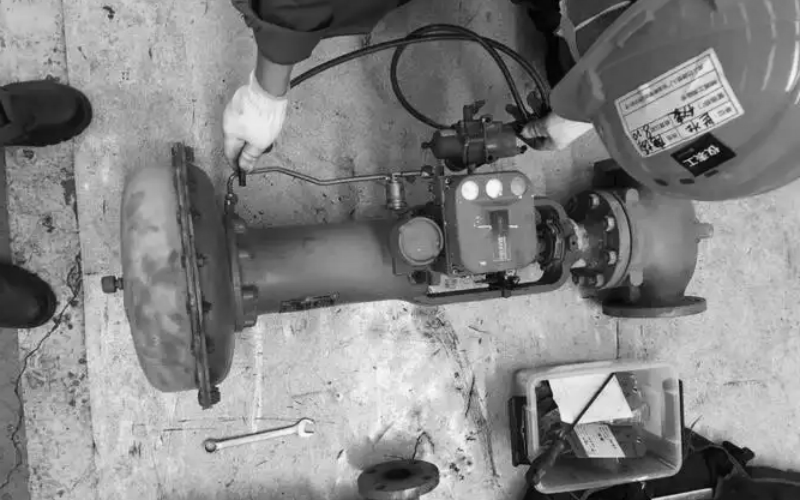
When a control valve stops responding, the fault can sit anywhere in the loop: the signal, the positioner, the air supply, the actuator or the valve itself. The fastest way to find it is to walk the chain from the control signal down to the final element, rather than swapping parts and hoping.
Check the Control Signal
Start at the source. Confirm the control system is actually sending the command: check the loop output, normally 4-20 mA or a digital command, verify the wiring to the positioner, and make sure nothing is in manual mode or overridden. If the signal is present at the controller but missing at the positioner, the wiring or the I/O card is the problem.
Check the Positioner
If the signal arrives and the valve still does not move, look at the positioner. Check the supply pressure at its inlet, look for air leaks in the tubing and fittings, and confirm that the feedback linkage between the stem and the positioner is secure and correctly calibrated. A loose feedback arm or drifted calibration is a very common cause of no response or wrong position. On smart positioners, read the diagnostics and run an auto-calibration after any mechanical work.
Check the Air Supply
A pneumatic valve depends entirely on clean, dry instrument air. Check the filter regulator: is the output set correctly, typically 140-400 kPa? Is the filter clogged, the bowl full of water, or the line kinked or frozen? Moisture, oil and contamination in the supply are frequent causes of sluggish or stuck actuators.
Check the Actuator
Inspect the actuator itself. A leaking diaphragm or piston seal loses output force, a damaged spring breaks the fail-safe action, and a loose stem coupling means the actuator moves but the valve does not. If the design allows, stroke the valve manually and watch whether the stem travels freely through its full range.
Check the Valve Mechanics
If the actuator moves but the valve still will not operate, the trouble is inside the valve: scale or corrosion on the stem, an over-tightened packing gland, or foreign matter wedged between the plug and the seat or inside the cage. Check the packing first, then inspect the plug and seat area for debris, especially after pipeline flushing or commissioning.
A Quick Diagnostic Sequence
- Is the control signal present at the positioner? (wiring / loop output)
- Is supply air pressure correct at the positioner and actuator?
- Is the positioner feedback linkage secure and calibrated?
- Does the actuator stem move when stroked manually?
- Is the stem coupling tight between actuator and valve?
- Is the packing too tight or the stem corroded/stuck?
- Is there debris or scale in the plug/seat area?
- After any repair, re-calibrate the positioner and stroke-test the valve.
Symptom and Cause Summary
| Symptom | Likely Cause | First Check |
|---|---|---|
| No movement at all | No signal or no supply air | Loop output, wiring, air pressure |
| Valve moves then creeps back | Positioner drift or air leak | Calibration, tubing leaks |
| Slow or sluggish response | Low air supply, clogged filter, packing too tight | Filter regulator, packing gland |
| Actuator moves, valve does not | Loose coupling or stuck stem | Coupling, stem, packing |
| Valve stuck near one position | Debris in trim or stem scale | Plug/seat area, stem |
| Erratic position | Feedback linkage loose, calibration lost | Linkage, auto-calibration |
Conclusion
Most valve-not-responding faults are found by moving methodically from the signal to the final element. Keep loop documentation and a calibration log for each valve, and make the quick diagnostic sequence a standard procedure; it often turns a suspected valve failure into a ten-minute fix. For faults inside the valve body, send the service conditions to the manufacturer so the right repair or trim can be supplied.
 No products in the cart.